
Descripció
A block displaying sidebar widgets on front-end of your website.
What problem does it solve?
You can display a specific sidebar (a widgetized area) in a page content built with block editor.
Got a question or suggestion?
In case of any question or suggestion regarding this plugin, feel free to ask at support section, or at GitHub repository issues.
Captures

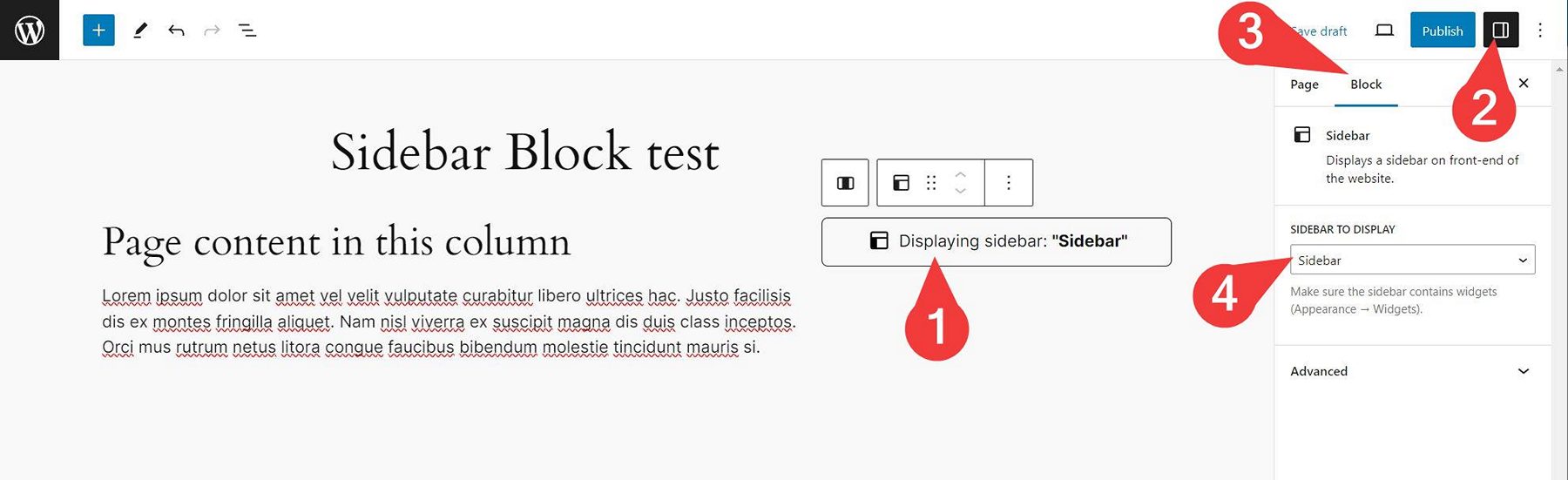

Blocs
Este complement proporciona 1 bloc.
- Wmd Sidebar
Instal·lació
- Unzip the plugin download file and upload
sidebar-blockfolder into the/wp-content/plugins/directory. - Activate the “Sidebar Block” plugin through the “Plugins” menu in WordPress.
- Plugin works immediately after activation by adding new “Sidebar” block into WordPress native block editor. You can use the block in your page/post content then. Simply select a sidebar in block options and the sidebar will be displayed on your website front-end (if it contains widgets).
PMF
-
How does it work?
-
- Insert “Sidebar“” block into your page/post content (or into Site Editor) where you want to display the sidebar.
- In block options select a sidebar to display.
- Save the post/page/Site Editor.
- Watch the sidebar appear on your website front-end.
Please note that the sidebar has to contain some widgets you can add in Appearance Widgets admin screen.
-
Yes. The plugin creates a new “Sidebar” widget area for you, if your theme does not create such sidebar (with ID of
sidebar) for you. -
Yes. This is possible by using additional sidebar management plugin.
Ressenyes
No hi ha ressenyes per a este complement.
Col·laboradors i desenvolupadors
«Sidebar Block» és programari de codi obert. La següent gent ha col·laborat en este complement.
Col·laboradors
“Sidebar Block” s’ha traduït a 1 configuració regional. Gràcies als traductors per les seues aportacions.
Traduïx «Sidebar Block» a la teua llengua.
T’interessa el desenvolupament?
Revisa el codi , dona una ullada al repositori SVN o subscriu-te al registre de desenvolupament per RSS.
Registre de canvis
Please see the changelog.md file for details.