

Descripció
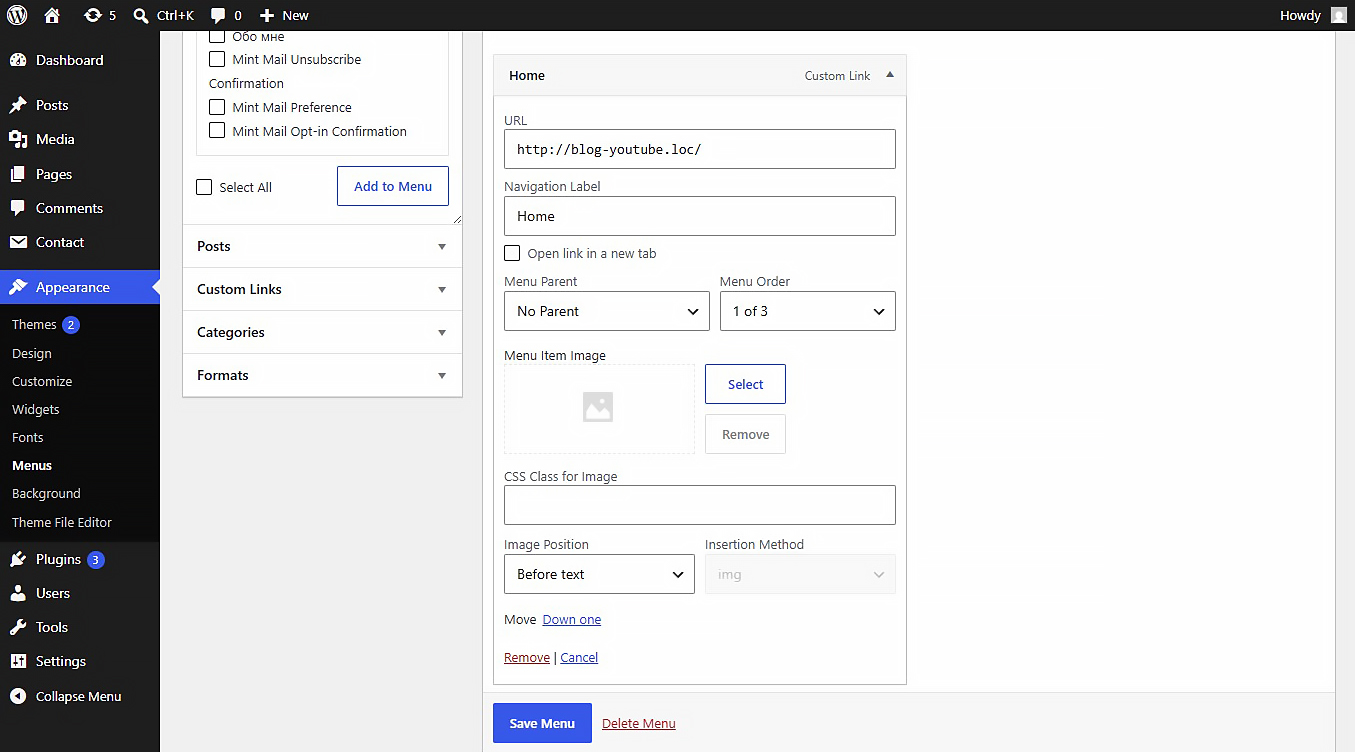
This plugin allows you to upload or link images (JPEG, PNG, WebP, SVG, etc.) directly inside the WordPress Customizer or Appearance > Menus panel. Includes built-in SVG sanitization for secure inline SVG injection.
Settings
After activating the plugin, navigate to Settings Media in your WordPress admin dashboard. There you will find the “NaviPix Settings” section where you can disable SVG upload support and SVG sanitization if needed. This gives you full control over whether the plugin handles SVG files or leaves them to your theme or other plugins.
Captures
Instal·lació
- Upload the plugin folder to the
/wp-content/plugins/directory. - Activate the plugin through the ‘Plugins’ menu in WordPress.
- Go to Appearance > Menus, open any menu item, and choose your image.
Ressenyes
No hi ha ressenyes per a este complement.
Col·laboradors i desenvolupadors
«NaviPix» és programari de codi obert. La següent gent ha col·laborat en este complement.
Col·laboradors
“NaviPix” s’ha traduït a 1 configuració regional. Gràcies als traductors per les seues aportacions.
Traduïx «NaviPix» a la teua llengua.
T’interessa el desenvolupament?
Revisa el codi , dona una ullada al repositori SVN o subscriu-te al registre de desenvolupament per RSS.
Registre de canvis
1.0.0
- Initial release.