
Descripció
GeoLens is a GEO (Generative Engine Optimization) tool that analyzes your website’s structured data and provides an AI Affinity Score — measuring how well AI engines can understand your site.
Features
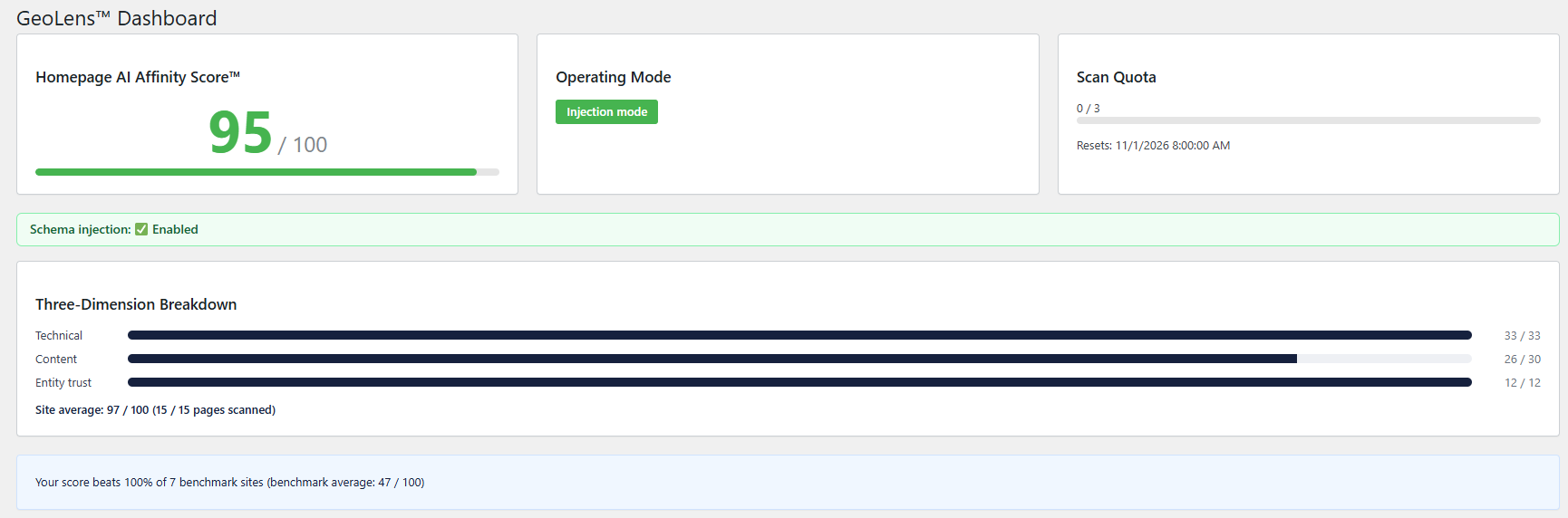
- AI Affinity Score — your site’s AI readability rating
- Schema.org structured data health check
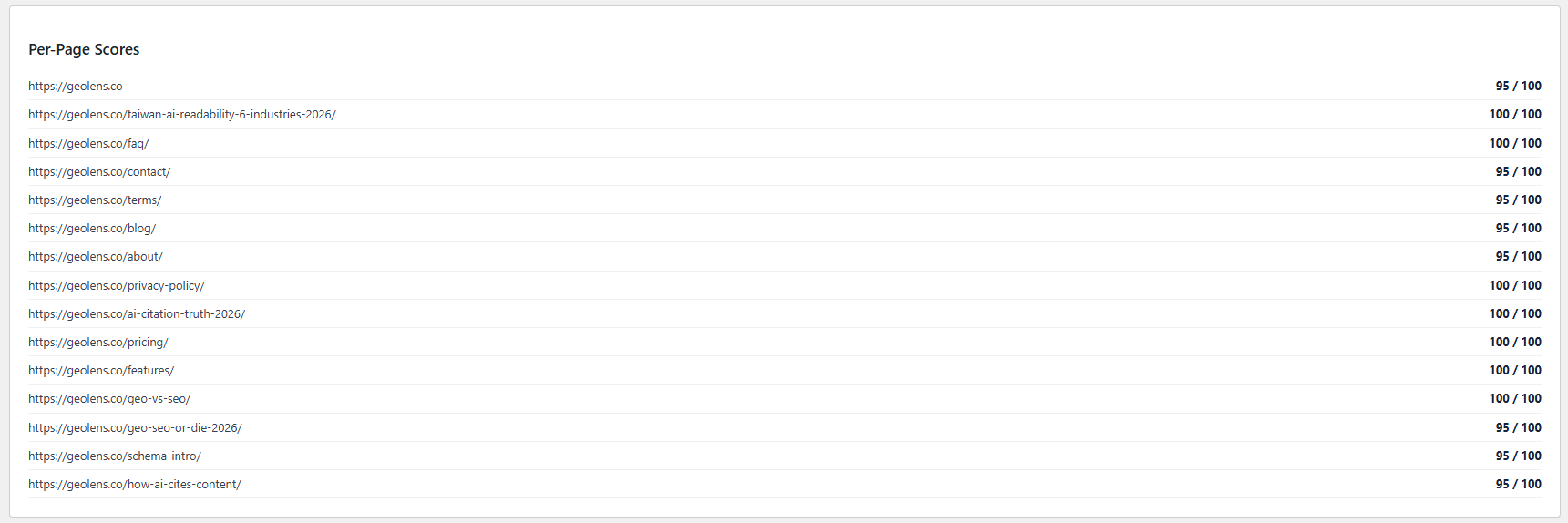
- Whole-site scan — your homepage plus up to 30 more pages, on every plan
- Automatic Schema injection, site-wide and included on every plan (Organization, WebSite, BreadcrumbList)
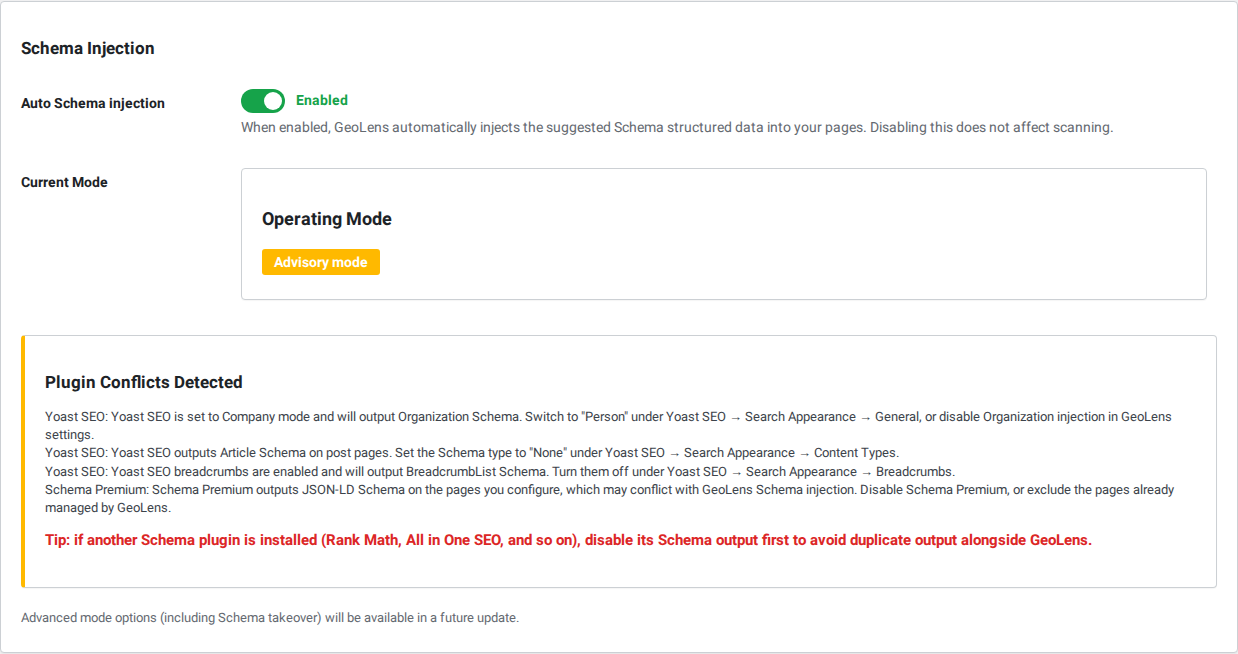
- Conflict detection for Yoast SEO, Rank Math, AIOSEO, Schema Premium
- Translation-ready
External Service
GeoLens is a client for the GeoLens service at https://geolens.co. The analysis runs
on our servers, so the plugin requires a free GeoLens account and will not work
without one. The account is free and can be created from the plugin’s settings
screen; no payment details are required.
When the plugin contacts the service
- When you run a scan — manually, or on the schedule you choose
- When a page is rendered with Schema injection enabled, to fetch that page’s
generated JSON-LD (results are cached) - When you open the GeoLens dashboard, to fetch your latest results
- When you open the AI Citation screen, to fetch the citation data for the questions
tracked for your site - When you create a free account from the settings screen, or activate or deactivate
a licence key - Once per day, to check your licence status
- If you have a paid subscription and cancel it from the Plans & Pricing screen
- When checking for plugin updates. This applies only to the build distributed from
geolens.co; the version installed from WordPress.org uses the WordPress.org update
system instead
What is sent when you run a scan — POST https://api.geolens.co/api/v1/scan
- Your site URL, site name, tagline, logo URL and site language
- WordPress version, PHP version, active theme, whether the site is multisite, and
the list of active plugins — the plugin list is used to detect Schema conflicts - The full contents of your
robots.txtandllms.txt, where present - For each analysed post or page: its ID, URL, title, excerpt (for posts with no
excerpt, the first 30 words of the content are used instead), author display name,
author archive URL, published and modified dates, featured image URL, categories,
tags, post type, comment count and word count - Any JSON-LD structured data already present on that page, including output produced
by other SEO plugins
What is sent when Schema is injected — POST https://api.geolens.co/api/v1/schemas/{id}
- The same per-post facts listed above, so that the returned Schema reflects the
page’s current state rather than the state at the last scan
What is sent when you create a free account — POST https://api.geolens.co/api/v1/register
- The email address you enter. The service replies with your licence key
What is sent when you activate or deactivate a licence —
POST https://api.geolens.co/api/v1/license/activate and /license/deactivate
- Your licence key and your site URL (deactivation sends the site URL only)
Requests that send nothing beyond your licence key
- Opening the dashboard —
GET https://api.geolens.co/api/v1/report/latest - Opening the AI Citation screen —
GET https://api.geolens.co/api/v1/visibility. The
service returns the questions tracked for your site, the domains AI assistants cited
for them, and when they were measured - The daily licence check —
GET https://api.geolens.co/api/v1/license/verify - Cancelling a paid subscription —
POST https://api.geolens.co/api/v1/subscription/cancel
Sent with every request
- Your GeoLens licence key, in the
X-Api-Keyheader
What is never sent
- The full content of your posts and pages
- Any personal data about your visitors
- WordPress usernames, passwords, or any administrator credentials
Payments
The plugin does not take payments. Paid plans are purchased on https://geolens.co.
Terms of Service: https://geolens.co/terms/
Privacy Policy: https://geolens.co/privacy-policy/
Captures
Instal·lació
- In WordPress Admin, go to Plugins Add New and search for “GeoLens” — or upload the plugin ZIP via Plugins Add New Upload Plugin
- Activate the plugin
- Go to Settings GeoLens
- Create a free account with your email address, or paste an existing API key
- Click “Start Scan” to check your AI Affinity Score
PMF
-
Do I need an account?
-
Yes. The analysis runs on the GeoLens service, so the plugin needs a free account to
work. You can create one from the plugin’s settings screen. No payment details are
required for the free plan. -
Is Schema injection limited on the free plan?
-
No. Automatic, site-wide Schema injection is included on every plan, the free one
included. -
What data does the plugin send to your servers?
-
See the “External Service” section above, which lists every field.
-
Will it conflict with Yoast SEO, Rank Math or AIOSEO?
-
GeoLens detects those plugins and stops injecting on pages where they already output
Schema, so you will not end up with duplicate structured data. The conflict status is
shown on the GeoLens dashboard. -
Can I turn Schema injection off?
-
Yes. There is a single toggle on the GeoLens settings screen, and it is independent
of your plan. -
Does the plugin work without an internet connection?
-
No. Analysis and Schema generation both happen on the GeoLens service. Injection
falls back to cached results when the service cannot be reached.
Ressenyes
No hi ha ressenyes per a este complement.
Col·laboradors i desenvolupadors
«GeoLens – AI Search Schema Checker» és programari de codi obert. La següent gent ha col·laborat en este complement.
Col·laboradors
Traduïx «GeoLens – AI Search Schema Checker» a la teua llengua.
T’interessa el desenvolupament?
Revisa el codi , dona una ullada al repositori SVN o subscriu-te al registre de desenvolupament per RSS.
Registre de canvis
1.13.7
- The Free plan now scans your whole site (homepage plus up to 30 pages), not just the homepage.
- While a free trial is running, the dashboard and the Plans page show when it ends and that your site then moves to the Free plan. Nothing is charged.
- Plans page: the subscription status is translated, and no status badge is shown on the Free plan.
- Plans page: if your admin language is not Chinese, a note explains that paid plans launch in Taiwan first and that the pricing page is in Traditional Chinese.
1.13.6
- Plans page: the “Current Plan” label no longer sticks out past the edge of its card.
1.13.5
- Dates on the dashboard (scan quota reset, last scan, AI Citation) now follow your WordPress language instead of the browser’s.
- Readme: the first screenshot caption now describes the current dashboard.
1.13.4
- Admin labels are now translatable: operating mode, issue severity, score dimensions and check names, the site-average and benchmark lines, the Schema injection status and the plan period. They were hard-coded in Traditional Chinese, so sites in other languages saw Chinese labels.
- Settings: the free-plan feature list shows the AI Affinity Score™ name in the site’s language.
- Internal: the server log line for an unreadable API key is now in English.
- Translation template (.pot) regenerated; removed strings left over from the in-plugin checkout removed in 1.13.0.
1.13.3
- Dashboard: removed the upgrade banner. Paid plans cannot be purchased yet, so it pointed to something that was not available.
- The “scan quota used” message no longer suggests upgrading; it says when the quota resets.
- Readme: the feature list now matches what the plugin does today.
- Internal: the Schema cache now uses this plugin’s own prefix (geolens_schema_cache_). Old cache entries expire on their own within six hours.
1.13.2
- Plugin name: now “GeoLens – AI Search Schema Checker”.
- Fix: fatal error on front-end requests when no other plugin had loaded wp-admin/includes/plugin.php (conflict detection now loads it itself).
- Readme: corrected the conflict-detection plugin list to match what is implemented.
- WordPress.org build: translations are delivered by translate.wordpress.org; bundled .po/.mo files are no longer shipped there.
1.13.1
- Plugin header: “Plugin URI” now points to the features page (https://geolens.co/features/), separate from the “Author URI” (https://geolens.co), as WordPress.org requires.
1.13.0
- Removed the in-plugin checkout. It was never reachable (paid plans are marked “Coming soon”); paid plans will be purchased on geolens.co.
- readme: the External Service section now also lists account creation, licence activation and deactivation, the dashboard and AI Citation requests, the daily licence check and the subscription cancel request.
- Tested up to WordPress 7.1.
- Code clean-up from the official Plugin Check: the PHP/WordPress version notices are escaped at output, and a direct database query that clears this plugin’s own cache is documented.
1.12.0
- AI Citation trend: when the measurement tool behind a tracked question changes, the trend line is broken at that point and marked, with a note giving the date. Figures either side of that date come from different measurement platforms and are not directly comparable.
- Why this matters: in a same-question, same-model, same-project test the two measurement platforms returned overlapping cited-domain sets only 17-44% of the time, with real rank flips. Without the mark, a change of tooling would read as a change in your site.
1.11.2
- AI Citation screen: full Traditional Chinese translation (21 new strings).
1.11.1
- AI Citation screen: the empty state now explains where tracked questions actually come from (the free GEO check-up run with the same email address) and links to it, instead of saying they appear after a scan.
1.11.0
- New “AI Citation” screen: see which sites AI assistants cite for the questions tracked for your site, and (on paid plans) how that changes over time.
- Questions with too few grounded samples are marked as such instead of being shown as a precise number.
1.10.0
- WordPress.org submission preparation.
- readme: added a complete “External Service” disclosure. Every field the plugin sends to api.geolens.co is now listed, including the fact that a post’s first 30 words are used when it has no excerpt.
- readme: added Frequently Asked Questions and Screenshots sections; “Tested up to” raised to 7.0.
- Build: the WordPress.org build contains no update code of its own and is updated only through WordPress.org.
- No behaviour change for existing self-hosted installations.
1.9.0
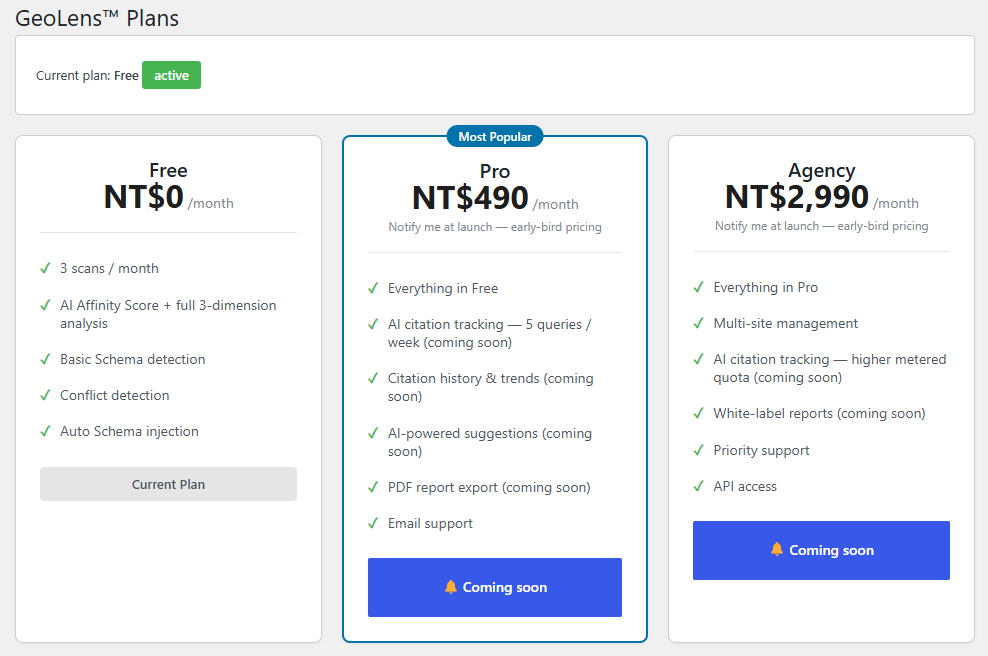
- 方案頁改版:免費版納入「自動 Schema 注入(全站)」;付費方案聚焦「AI 引用度追蹤」。
- Pro / Agency 更新為 NT$490 / NT$2,990,功能上線前顯示「即將推出」,暫不開放結帳(不預收未交付服務的費用)。
1.8.0
- 變更:Schema 自動注入改為所有方案免費(含 Free),不再限定付費方案。
- 注入仍可由「設定 Schema 注入」開關自行關閉;偵測到其他 SEO 外掛衝突時一樣自動退為建議模式。
- Free 方案發布文章後同樣會自動補掃,讓新內容立即帶有 Schema。
1.7.0
- 新增:結帳時可填電子發票資訊(個人雲端載具/手機條碼/統一編號/捐贈),開立方式會隨訂閱保存,每期扣款沿用。
- 未填時預設開立雲端發票寄到帳號 Email,行為與先前一致。
1.6.0
- 新增:訂閱者可在「方案與定價」頁自助取消訂閱,不需來信客服。
- 取消會先終止金流的定期扣款委託,成功後才標記取消;終止失敗時保留訂閱並提示聯絡客服,避免「畫面顯示已取消、金流仍扣款」。
- 取消後仍可使用至本期結束,届時自動降為免費版。
1.5.0
- 新增:內容發布後自動補掃一次,讓新頁面立刻取得 Schema,不必等待每日排程(先前新文章在下次排程前沒有結構化資料)。
- 連續發布會合併為單一次掃描;免費方案與停用注入時不觸發,避免消耗掃描配額。
1.4.5 — 2026-07-21
- Fix: the upgrade button no longer gets stuck on “Processing…” when checkout cannot be completed. The error message was shown correctly, but the button never went back to its normal state, so the page looked frozen and there was no obvious way to try again. It now returns to normal as soon as the message appears.
1.4.4 — 2026-07-20
- The yearly billing option is temporarily hidden while we finalise our payment provider arrangements. Monthly billing is unaffected and nothing about your current plan changes. Yearly pricing and the switch are kept in place rather than removed, so they can be brought back as soon as the arrangements are settled.
1.4.3 — 2026-07-20
- Your posts’ author is now published with a link to their profile, not just a name. A name on its own gives an AI no way to check who wrote the piece, so GeoLens only counted it as half an answer; the link points at the author archive WordPress already creates for you. Worth pairing with a real bio on that author profile — the link is only as convincing as the page it leads to.
1.4.2 — 2026-07-20
- The big score on the dashboard is now labelled “Homepage AI Affinity Score”, because that is what it has always been. It sits directly above the whole-site average, so without the label it read as a score for your entire site — two different numbers with no way to tell them apart. The score, the three dimensions below it and the benchmark all describe your homepage; the whole-site average and the per-page list cover the rest.
1.4.1 — 2026-07-20
- Fix: a whole-site scan now shows its real progress and final result. The scan page used to refresh once, 1.5 seconds after you pressed Scan — but the other pages are scanned in the background and take longer than that, so it always showed something like “2 / 13 pages scanned” and never updated. It looked as if GeoLens only scanned your homepage, and pressing Scan again just used up another scan from your monthly allowance. GeoLens now follows the scan through to the end, shows the page count as it climbs, and refreshes when every page is done.
1.4.0 — 2026-07-16
- Fix: the Schema GeoLens injects now follows your page’s structure, not just its text. 1.3.1 kept the title, description and dates current, but the shape of the Schema still came from your last scan — so if you deleted a featured image, the Schema kept pointing at a picture that no longer exists; if you changed a page’s URL, the whole Schema still described the old address. GeoLens now sends the page’s current details when it fetches the Schema, and the server rebuilds it to match. Pages that already have Schema from another plugin are still left alone, exactly as before.
1.3.1 — 2026-07-16
- Fix: the Schema GeoLens injects could disagree with your page indefinitely. The injected
dateModified,descriptionand page title came from your last scan and were never refreshed, so editing a page left the structured data describing the old version — telling AI crawlers and search engines that your page is older, and less accurate, than it really is. GeoLens now fills those fields from the live page every time it injects, so they always match what a visitor sees. Everything else in the Schema still comes from your scan, as before.
1.3.0 — 2026-07-16
- Change: how GeoLens stores your API key has been reworked. Your key is still encrypted with your site’s own security key (AUTH_KEY), but it now uses AES-256-GCM, which can tell an incorrect key from a correct one every time. The previous method could not: roughly 1 attempt in 256 would silently return corrupted data, which reached the server as an invalid key and reported “licence invalid” instead of the real problem. Existing sites upgrade automatically on first load — you do not need to re-enter anything.
- Fix: your plan and quota are no longer encrypted. They are not secrets, and encrypting them meant that a change to your site’s AUTH_KEY silently reverted a Pro site to the free plan and switched Schema injection off, with no message anywhere. Rotating AUTH_KEY is a normal, officially supported WordPress operation (
wp config shuffle-salts, and standard practice after a security incident), so this could happen to anyone following good security advice. - New: GeoLens now records a fingerprint of the security key that encrypted your API key. If AUTH_KEY later changes, GeoLens can say so directly — “your site’s security key changed” — instead of guessing from a failed decryption.
- Fix: a missing AUTH_KEY no longer causes a fatal error on the front end.
1.2.6 — 2026-07-16
- Fix: if your site’s security keys (AUTH_KEY in wp-config.php) changed — after a rotation, restore, or migration — GeoLens could no longer decrypt the API key saved on your site, and behaved exactly as if the plugin had never been set up: the dashboard went blank and the Settings page offered a fresh sign-up. Registering again creates a brand-new, empty account, so the scan history appeared to be lost when it was not. GeoLens now recognises this state, tells you your account and history are safe, asks you to re-enter your existing key, and explicitly warns against registering again. The failure is also written to the error log once a day so it can be diagnosed.
1.2.5 — 2026-07-15
- Fix: free registration from the Settings page never worked — it called a malformed URL (the API prefix was added twice) and the server answered 404, so every new user saw a raw “route could not be found” error instead of getting an API key. The endpoint is now correct.
- Change: licence activation and free registration are no longer duplicated between two code paths. Both were implemented twice with drifting behaviour; they now share one implementation.
1.2.4 — 2026-07-15
- Fix: entering an incorrect API key on the Settings page overwrote your existing working key before activation was attempted, so a single typo both failed to activate and locked you out of the plugin until you re-entered the correct key. The key is now saved only after activation succeeds.
1.2.3 — 2026-07-15
- Fix: the admin interface appeared in Chinese on English sites. 120 of the plugin’s 157 translatable strings had been written with Chinese source text, so they matched no entry in the translation catalogue and were shown as-is in every language. All source strings are now English and the catalogue has been rebuilt; Traditional Chinese sites look exactly as before.
- Fix: conflict advice from the Yoast / Rank Math / AIOSEO / Schema Premium detectors, the plugin name and description, and two scan error messages were hard-coded Chinese with no translation support at all. They are now translatable.
- Fix: several messages (licence deactivation, checkout validation, registration) shipped English-only and never had a Traditional Chinese translation. They do now.
- Fix: the upgrade link on the Settings page built its translatable text by concatenating a URL, which meant the string could never be translated in any language. It now uses a placeholder.
1.2.2 — 2026-07-15
- Fix: Schema injection could switch itself off after a scan and only come back on the next one. The scan read the page over HTTP and counted GeoLens’s own injected Schema as “this page already has Schema”, so the next scan produced no suggestions and injection stopped until the scan after that. GeoLens now marks its own output and ignores it while scanning, so a scanned page reports the Schema it has without GeoLens — injection stays on. Schema from other plugins (Yoast, Rank Math, Schema Premium, …) is still detected exactly as before.
1.2.1 — 2026-07-13
- Change: Pricing now lists the full three-dimension analysis correctly (was mislabelled “5-dimension / coming soon”) and shows it as included on every plan, matching what the dashboard already delivers
1.2.0 — 2026-07-12
- New: One-click updates — GeoLens now checks api.geolens.co for new releases and shows the “Update now” button on the Plugins screen, like any other plugin (no more manual re-download)
- Note: Existing 1.1.0 sites need one manual update to 1.2.0; every version after that updates with one click
1.1.0 — 2026-07-11
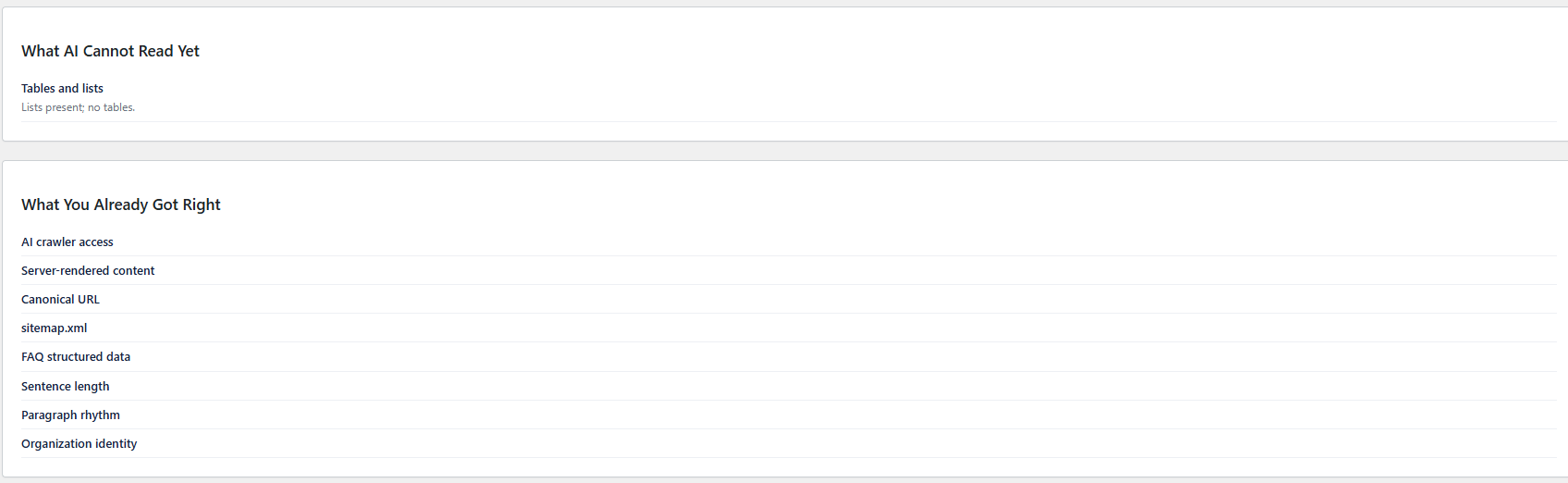
- New: Dashboard now shows the GEO Score v2 report — three-dimension breakdown (Technical / Content / Entity trust), whole-site average, per-page scores, “what AI can’t read” / “what already works” findings, and a “you vs the field” benchmark
- Change: Score reads as “58 / 100”; the dashboard falls back to the legacy issue list for older scans
1.0.10 — 2026-04-04
- Fix: License valid flag not synced on plan upgrade — scan failed with “License invalid” after upgrading
- Fix: Clear license transient cache on dashboard sync to prevent stale isValid() check
1.0.9 — 2026-04-04
- Fix: Dashboard scan button broken due to undefined JS variable
- Fix: Schema injection toggle now persists correctly (WP get_option boolean fix)
- Fix: Free plan dashboard no longer shows “Schema injection enabled”
- Fix: Plan cache auto-sync from API on dashboard load (upgrade reflected immediately)
- Fix: Free plan and injection-disabled show “Advisory Mode” instead of “Inject Mode”
- Feature: Auto-enable Schema injection on plan upgrade
- Feature: Delete Tenant button in admin test panel
- Feature: Email confirmation field on register and checkout pages
- Feature: Legal links (Terms + Privacy) on checkout and Plugin pricing pages
1.0.8 — 2026-04-03
- Feature: Schema injection toggle — enable/disable auto injection in Settings page
- Feature: Dashboard shows Schema injection status indicator
- Feature: Toggle switch with real-time AJAX save (no page reload needed)
1.0.7 — 2026-04-03
- Fix: Pricing page yearly display shows total price (NT$2,990/year) instead of monthly average
- Fix: Current plan label shows actual billing period from API (not affected by period toggle)
- Feature: API returns billing_period field for accurate plan display
- Fix: Upgrade blocked with clear message showing current plan and expiry date
- i18n: Add monthlyBilling/yearlyBilling localization strings
1.0.6 — 2026-04-02
- Fix: API Key activation flow — save new key on activate and re-create client
- Fix: Dashboard correctly distinguishes no-scan from no-license state
- Fix: Pass original API error code through WP_Error to frontend
- Improvement: Force browser JS cache refresh on version update
1.0.5 — 2026-04-01
- Feature: Send rich metadata (page type, post status, categories) for Schema generation
- Fix: Use wp_remote_get to capture frontend JSON-LD instead of admin-context wp_head
- Fix: Update JSON-LD regex to match script tags with extra attributes
- Fix: Support blog archive page (page_for_posts) in Schema Injector
1.0.4 — 2026-04-01
- i18n: Full Traditional Chinese translation for all admin UI
- i18n: Translate mode badge and severity labels in renderer.js
- Feature: Show page URL in issues detail list
- Fix: Correct Pro scan limit text (100 scans/month)
- Fix: Mark unreleased features as “coming soon”
1.0.3 — 2026-04-01
- Feature: In-plugin free registration (email-based)
- Feature: “Forgot API Key” link for key recovery
- Fix: Correct forgot API Key link URL
1.0.2 — 2026-03-31
- Brand: Unify AI Affinity Score™ naming across all plugin files
1.0.1 — 2026-03-31
- Brand: Unify AI naming conventions across plugin
1.0.0 — 2026-03-29
- Initial release
- Schema health check and AI Affinity Score
- Auto Schema injection (Organization, WebSite, BreadcrumbList)
- Conflict detection (Yoast SEO, AIOSEO, Rank Math)
- Full i18n support (en, zh_TW)